Grass Effect Photoshop Action: Bringing Nature to Your Digital Designs
In the world of digital design, there is a constant tug-of-war between sleek, minimalist aesthetics and rich, textured realism. Sometimes, a flat vector logo just doesn't convey the organic energy needed for a brand or project. This is where the Grass Effect Photoshop Action becomes an indispensable tool. It isn't just a filter; it is a workflow accelerator that instantly transforms standard text or vector shapes into lush, vibrant, three-dimensional grass. For designers looking to inject life, playfulness, and an eco-conscious vibe into their work without spending hours manually painting textures, this action offers a seamless bridge between concept and final execution.
Transforming Static Text into Living Landscapes
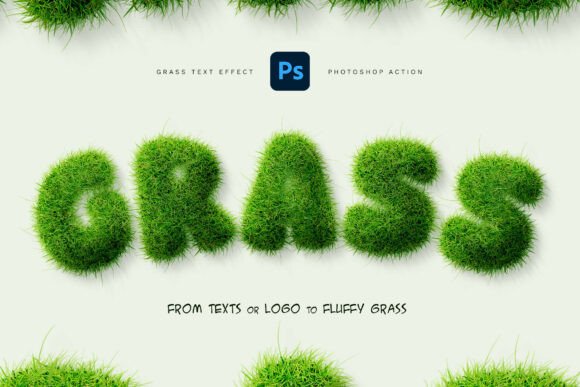
The core appeal of this tool lies in its ability to take the most basic elements—text layers or simple logos—and give them depth and volume. Imagine a headline for a summer music festival or a logo for a local gardening center. In their default state, they might look clean but generic. When you apply the Grass Effect Photoshop Action, those letters suddenly sprout blades of greenery, complete with realistic lighting, shadows, and density variations. The result is not a flat image with a texture overlay, but a convincing 3D appearance that feels tactile.
This transformation is particularly powerful because it maintains the integrity of your original design. Whether you are working with bold sans-serif fonts for a modern tech startup's sustainability initiative or elegant script fonts for a boutique organic skincare line, the action adapts to the shape. The non-destructive nature of the process means you can tweak the outcome endlessly. If the grass looks too dense, you can adjust the settings. If the color needs to match a specific brand palette, the editable layers allow for instant customization without ruining the underlying structure.
Real-World Applications Across Industries
While the visual impact is immediate, the true value of the Grass Effect Photoshop Action shines when applied to specific real-world scenarios. Different industries leverage this effect to solve unique communication challenges.
Eco-Friendly Branding and Sustainability Projects
For brands focused on environmental responsibility, nothing speaks louder than imagery that feels genuinely natural. A recycling company, a renewable energy firm, or a zero-waste product line can use this effect to visually reinforce their mission. Instead of using stock photos of forests which might feel disconnected from the brand identity, applying the grass effect directly to the company logo creates a unified visual language. It tells the audience immediately that this brand is rooted in nature, growth, and vitality. The organic texture adds a layer of authenticity that synthetic graphics often lack.
Playful Design for Children and Education
Designing for kids requires a balance of fun and engagement. Schools, toy manufacturers, and children's book publishers often struggle to create typography that feels energetic yet readable. The fluffy, vibrant nature of the grass effect is perfect for headlines in educational materials, party invitations, or packaging for outdoor toys. It evokes feelings of parks, playgrounds, and adventure. The "fresh and playful" aesthetic mentioned in the tool's description is exactly what captures a child's attention, making the content feel approachable and exciting rather than rigid and academic.
Event Marketing and Seasonal Campaigns
Seasonal marketing relies heavily on timely visuals. Spring and summer campaigns, in particular, benefit immensely from this effect. Event planners organizing outdoor festivals, garden parties, or sports tournaments can use the Grass Effect Photoshop Action to create eye-catching posters and flyers. By turning event names or dates into grassy typography, the design immediately sets the scene. It suggests an outdoor setting and a relaxed atmosphere before the viewer even reads the details. This contextual cue is vital for driving attendance and interest.
Creative Typography and Editorial Work
Graphic designers and typographers often push the boundaries of how text can be perceived. Using this action allows for creative experimentation in editorial layouts, magazine covers, and album art. It turns words into landscapes. A word like "Growth," "Nature," or "Spring" gains a literal dimension when rendered in grass. This technique adds a narrative layer to the design, encouraging the viewer to pause and appreciate the craftsmanship. It elevates standard typography into an artistic statement.
Why Designers Choose This Workflow
Efficiency is the currency of professional design. Creating a realistic grass texture from scratch involves complex masking, brush work, lighting adjustments, and shadow rendering—a process that can easily consume several hours. The Grass Effect Photoshop Action condenses this entire workflow into a single click. However, it goes beyond simple automation. The inclusion of custom brushes (.ABR) and patterns (.PAT) ensures that the results are high-quality and not just generic clip-art.
One of the most significant advantages is the flexibility offered by the PSD template included in the package. This allows users to start with a pre-organized structure, meaning you don't have to guess where to place your text or how to layer the effects. The clean, organized layers ensure that if a client asks for a change in the grass color to match a new brand guideline, you can make that adjustment in seconds rather than starting over. This adaptability makes it suitable for both one-off projects and ongoing branding campaigns.
Considerations Before You Start
While the Grass Effect Photoshop Action is incredibly versatile, understanding its limitations helps set realistic expectations. The quality of the final output depends heavily on the input. Complex, intricate vector logos with very fine details might lose some definition when covered in the grass texture, as the blades of grass need space to render realistically. Simple, bold shapes generally yield the best results. Additionally, while the action provides a photorealistic base, achieving a perfect integration with a background photo may still require manual tweaks to lighting and perspective to ensure the grass looks like it belongs in that specific environment.
It is also important to remember that the preview images serve as inspiration. The fonts and specific background images used in promotional materials are usually not part of the download. Users will need to supply their own typography and background assets. However, once these elements are in place, the action handles the heavy lifting of texture generation, shading, and depth creation.
Bringing Your Vision to Life
Ultimately, the Grass Effect Photoshop Action is more than a technical asset; it is a creative catalyst. It empowers designers to explore themes of nature, growth, and playfulness with confidence and speed. Whether you are crafting a logo for a new eco-brand, designing a flyer for a community park cleanup, or simply looking to add a touch of whimsy to a headline, this tool provides the necessary ingredients for success. By combining ease of use with professional-grade results, it allows you to focus on the bigger picture of your design strategy while leaving the tedious texturing work to the automation. In a field where standing out is crucial, giving your text the ability to grow and breathe can be the difference between a good design and a memorable one.