Coquette Pink Christmas Pattern Paper: A Practical Guide for Creators
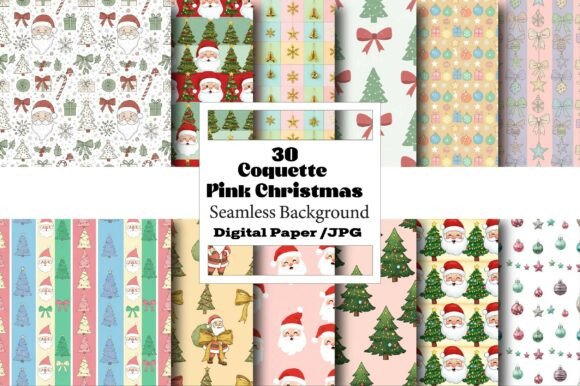
The Coquette Pink Christmas Pattern Paper has become a staple for those looking to infuse the holiday season with a touch of soft, romantic charm. Unlike traditional red-and-green motifs that can feel overwhelming or dated, this aesthetic leans into ribbons, bows, and pastel hues to create a timeless look. Whether you are designing sublimation graphics for mugs, crafting mini junk journals, or printing personalized labels for soap products, this seamless pattern offers a versatile foundation. However, having access to high-resolution digital files is only half the battle. The difference between a professional-looking final product and a disappointing DIY attempt often lies in how you handle the file before it ever reaches your printer or heat press.
Understanding the File Format and Resolution
One of the most common misunderstandings when purchasing digital assets like the Coquette Pink Christmas Pattern Paper is assuming that "high resolution" automatically guarantees print quality on every surface. While the files provided are indeed 300 DPI JPGs—a standard requirement for crisp printing—this does not mean they will scale infinitely without consequence. Many creators make the mistake of dragging a small preview image onto a large canvas, such as a tote bag or a poster, and stretching it to fit. This action forces the software to interpolate pixels, resulting in a blurry, pixelated mess that ruins the delicate details of the coquette style.
To avoid this, always check the actual pixel dimensions of the file before you begin your project. If you are creating a tumbler wrap or a large wall art piece, ensure the original file size matches the physical dimensions you intend to print at 300 DPI. For instance, if you need an 8x10 inch print, your file should be at least 2400x3000 pixels. If the file is smaller, do not stretch it; instead, use it for smaller applications like stickers, playing cards, or notebook covers where the lower pixel count remains sharp. Understanding the relationship between DPI and physical size is crucial for maintaining the integrity of the design.
Color Management and Sublimation Pitfalls
When moving from screen to physical product, color accuracy is another area where projects frequently falter. The soft pinks and subtle gradients found in the Coquette Pink Christmas Pattern Paper can appear vibrant on a calibrated monitor but may shift significantly when printed. This is particularly true for sublimation projects on tumblers, mugs, or fabric. A frequent error is ignoring the color profile settings in your design software. If you work in RGB mode (standard for screens) and send the file directly to a CMYK printer without conversion, the pinks may turn muddy or dull, losing the "coquette" aesthetic entirely.
Before committing to a batch of party napkins, plates, or personalized pillows, run a test print on the exact material you plan to use. Check how the pink tones react to the specific ink set and paper type. If you are using this pattern for digital presentations or social media backgrounds, the RGB values will hold up well, but for physical goods, a test run is non-negotiable. This step saves you from wasting expensive sublimation blanks and ensures the final product matches the vision you saw on your screen.
Seamless Repetition and Layout Errors
A defining feature of this asset is its seamless nature, designed to tile perfectly across surfaces. Yet, many beginners overlook the importance of proper alignment when applying the pattern to irregular shapes or large areas. When creating packaging, book covers, or wallpaper, simply copying and pasting the image side-by-side can sometimes reveal visible seams or misalignments if the grid isn't set correctly in your editing software.
To achieve a flawless look, utilize the "pattern fill" or "tile" function in your design program rather than manually arranging copies. This ensures the edges match perfectly, creating an infinite loop that looks intentional rather than repetitive. For items like wind spinners or 3D art, where the surface curves, pay close attention to how the pattern wraps around the object. Misalignment here can break the visual flow and make the design look amateurish. Taking the time to adjust the offset or rotation within your software before printing ensures a polished finish that elevates the perceived value of your craft.
Copyright and Usage Boundaries
Another critical aspect often missed by new entrepreneurs is understanding the scope of the license. The Coquette Pink Christmas Pattern Paper is typically sold as an instant digital download for personal and commercial use, but this does not grant ownership of the design itself. A common mistake is re-selling the raw digital file or claiming the artwork as your own original creation. You cannot list the unmodified JPG files on Etsy or other marketplaces for others to download.
Instead, the correct approach is to incorporate the pattern into a finished product. You can sell the t-shirts, the scrapbook decoupage kits, or the printed planners, but the underlying digital asset must remain part of a larger, transformed item. Always review the terms of service included with your download to ensure you are compliant. Violating these terms can lead to legal issues and damage your reputation as a creator. By respecting intellectual property rights, you protect both yourself and the artist who created the beautiful patterns you enjoy using.
Optimizing Your Workflow for Efficiency
Finally, efficiency plays a major role in how you utilize these digital papers. Because the files come in high resolution, they can be quite large, potentially slowing down your computer if you are working on complex projects involving multiple layers, such as detailed scrapbooking layouts or intricate graphic designs. It is wise to organize your downloads immediately upon purchase. Create a dedicated folder structure for different project types, such as "Sublimation," "Printables," or "Web Graphics."
Additionally, since the original files do not include watermarks, there is no need to spend time removing them, which streamlines your workflow. However, do save a master copy of the original file before resizing or editing. Working on a duplicate allows you to return to the pristine version if you make a mistake during the design process. Whether you are preparing invitations for a bridal shower, designing logos for a website, or creating trendy social media backgrounds, a structured approach to file management ensures you can focus on creativity rather than troubleshooting technical glitches.
By paying attention to resolution limits, color profiles, seamless alignment, licensing terms, and file organization, you can maximize the potential of the Coquette Pink Christmas Pattern Paper. These practical steps transform a simple digital download into a powerful tool for producing high-quality, professional-grade crafts and designs that truly capture the spirit of the season.